
.svg)




TL;DR
You’ll stand up a minimal MCP server, wire two real tools (one read, one write), add inline guardrails, light tracing, and CI tests. By the end, your full-stack team can turn a chat prompt into governed actions across your APIs with predictable cost and clean debuggability.
Who this is for
Full-stack teams that own features end-to-end and want a single, safe way to let agents (and IDE copilots) call your internal tools and services.
What you’ll ship (today)
- A minimal MCP server (Node or Python) running locally over stdio
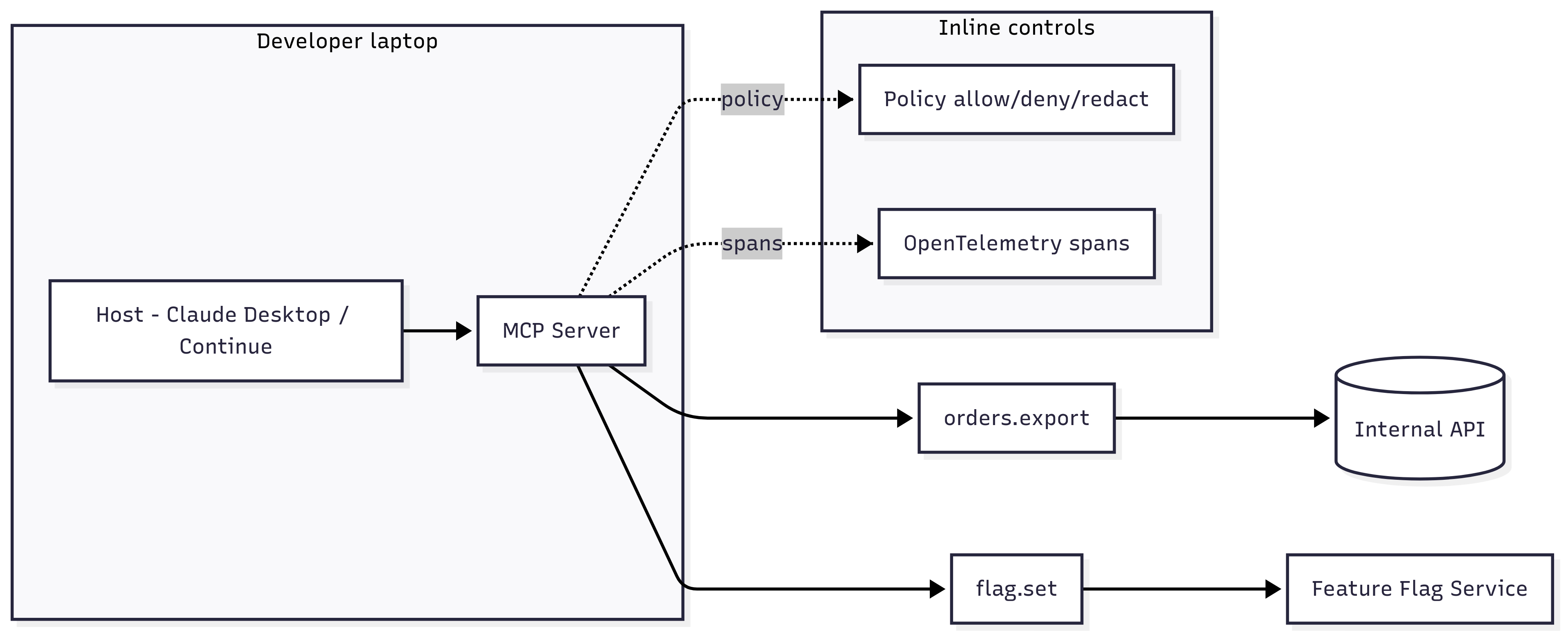
- Two tools: orders.export (read with masking) and flag.set (write with limits)
- Inline policy: allow, deny, redact + region routing
- Traces: spans stitched for agent → MCP → API with useful attributes
- CI checks: golden flow + one adversarial “don’t allow bulk write without ticket”
- Host config (Claude Desktop or VS Code + Continue) to use your server
Prerequisites
- Node 18+ or Python 3.10+
- A test API to hit (even a mock)
- VS Code (optional), Git, a place to run CI
Architecture at a glance
Play 0 - Scaffold the server (10–15 min)
Option A: TypeScript (Node)
Option B: Python
Play 1 - Wire a host (Claude Desktop or VS Code)
Claude Desktop (example)
Restart Claude Desktop, approve tools, try:
- “Export orders from 2025-08-25 to 2025-08-31 with emails masked”
- “Set flag checkout_v2 to 10 percent in staging”
- “Set flag checkout_v2 to 50 percent in prod” → expect deny without ticket
VS Code + Continue (conceptual)
Open Continue’s settings and register a “custom MCP server” with command and args pointing to your script. Test the same prompts inside the IDE.
Play 2 - Put policy in the path
Start with three rules: deny risky bulk, redact PII, route by region. Keep rules fast.
Tip: Start in “shadow mode” for new rules to measure impact before enforcing.
Play 3 - Identity and scopes for non-humans
Issue short-lived tokens, scope by tool and purpose, require JIT elevation for prod writes.
Elevation example:
Play 4 - Add traces you can actually use
Emit spans and attributes that make debugging obvious.
Useful span names
Helpful attributes
Even if you do not run a full OTEL stack yet, log these attributes next to each tool call.
Play 5 - Tests that prevent bad days
Add two test classes to CI:
- Golden flow: “Export orders with email masked” → expect count and masked emails.
- Adversarial: “Set checkout_v2 to 50 percent in prod” without ticket → expect deny and reason.
Example (pseudo-JS):
Play 6 - Rollout patterns that won’t wake you up at 2am
- Roll flags to 10 percent first, auto-rollback on error spike
- Require
ticketfor prod changes >10 percent - Use idempotency keys for any write tool to avoid double writes
- Put rate limits and concurrency caps on hot tools
Play 7 - Data privacy in motion
- Redact sensitive fields in prompts and outputs (email, PAN, tokens)
- Route EU data to EU storage; block unknown vendors
- Keep a “deny by default” for new external egress until reviewed
Play 8 - Cost and loop control
- Budgets per agent and per tool (e.g., daily LLM $50 for
agent:copilot) - Stop rules for long plans; alert on bursty retries
- Per-tool rate limits and P95 latency SLOs
Budget guard example:
Ops checklist (pin this to your repo)
Stdioserver runs locally; host config checked in (paths templated)- Tools have examples and schemas; inputs validated
- Policy rules in repo; shadow mode for new ones; tests pass
- Traces or structured logs with actor, tool, decision, pii.count
- Idempotency keys on writes; rate limits and caps applied
- Golden + adversarial tests in CI; PR template asks for both
- README: how to run server, host config, common prompts
Troubleshooting quickies
- Host does not see tools: wrong path or missing stdin/stdout transport, restart host.
- Tool runs but returns nothing: return envelope must include
content. - Policy blocks everything: switch new rules to shadow mode, print debug fields.
- Double writes: add idempotency key, check retries and timeouts.
- Telemetry spam: sample spans or log only on errors at first.
What good looks like after 2–3 sprints
- New internal tool wrapped in 1–2 days, with examples and tests
- 95 percent of actions have signed traces or structured logs
- Inline policy denies at least one risky action per month with low false positives
- No surprise LLM or API bills; budgets and caps visible in dashboards
- Other teams reuse your tools instead of building one-offs
How Levo can help
Levo gives your team production-grade rails without the yak-shave: mesh visibility stitched by identity, inline policy and redaction in the path, signed evidence you can export, exploit-aware tests for CI, and budget guards. You keep building features; Levo keeps actions safe, observable, and within limits.
Interested to see how this looks in practice: Book a demo.
Learn more: Levo MCP server use case → https://www.levo.ai/use-case/mcp-server
Conclusion
MCP gives full-stack teams a practical way to turn prompts into real, governed actions across internal APIs. By starting with a minimal server and adding inline guardrails, scoped identity, tracing, and CI tests, teams can safely enable agent-driven workflows without losing control or visibility.
The focus should be on implementing core foundations early such as schema validation, policy enforcement, and basic observability. Once these are in place, teams can scale with confidence by adding cost controls, adversarial testing, and rollout safeguards. This approach ensures faster delivery, predictable costs, and systems that are easy to debug and trust in production.
FAQs
What is an MCP server and why is it useful?
An MCP server exposes internal tools that AI agents or copilots can call to perform actions. It creates a controlled layer that connects prompts to real systems safely.
How do MCP tools like orders.export and flag.set help teams?
These tools represent real actions such as reading data or updating configurations. They allow teams to standardize how agents interact with APIs using structured inputs and outputs.
Why is inline policy important in MCP systems?
Inline policy enforces rules like allow, deny, and redact during execution. This prevents unsafe actions before they reach backend systems.
What role does tracing play in MCP workflows?
Tracing captures the full flow from agent to tool to API with useful metadata. It helps teams debug issues quickly and understand system behavior clearly.
How do CI tests improve MCP reliability?
CI tests validate both normal and adversarial scenarios. They ensure that expected actions work correctly and unsafe actions are blocked before deployment.
How can teams control cost and performance in MCP setups?
Teams can use budgets, rate limits, and concurrency caps to manage usage. Stop rules and monitoring help prevent excessive retries and unexpected costs.






.png)
.png)
